
Choose the account
Offer health spending, wellness spending, or both. Define eligible expenses and allocations within the plan’s requirements.
FOR EMPLOYERS
Dental bills. Prescription glasses. Eligible care your current plan doesn’t fully cover. An Aya Health Spending Account gives employees an employer-funded allowance they can use where they need it. You set the benefit limits and plan rules.







SEE THE ADMINISTRATION
See how employee records, plan information, invoices and reporting fit into day-to-day administration.
Open the Prepay administrator guide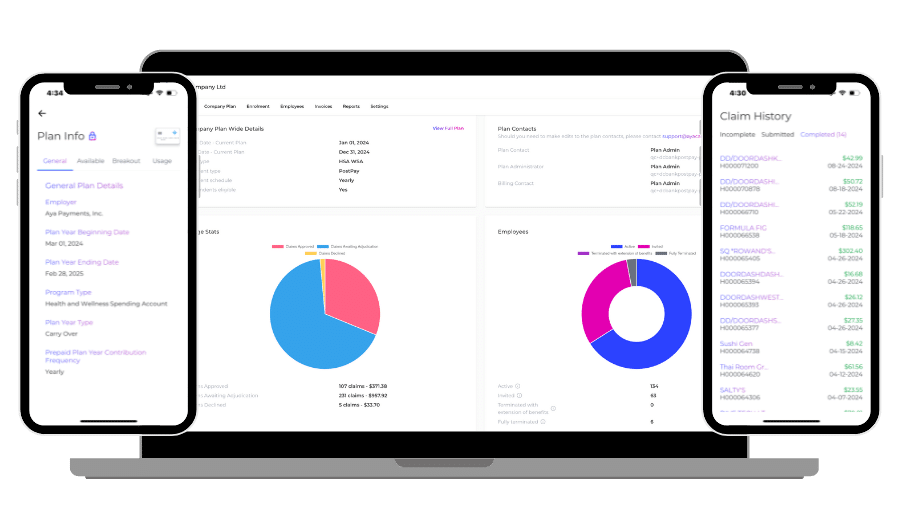
PLAN YOUR SPEND
Estimate one year of Aya fees and benefit funding. Enter your assumptions or choose the labelled example.
Enter the four numbers to see your estimate, or try the illustrative example.
Aya administration + new cards
—Aya subscription + EFTs
——
Only the planning numbers above are carried into your request in this tab. You can review or clear them there.
Planning estimate, not a quote. Assumes a full year of enrolment, one new card per Prepay employee, no reloads beyond the stated annual load, and the number of EFTs entered. It does not treat unused Prepay funds as a refund. Taxes, advisor fees and other agreed charges are excluded. The example inputs are illustrative, not typical Aya customer values.
Enable JavaScript to calculate an estimate. The pricing page explains the fees; ask Aya for a written quote.
Reviewing your insurance plan?
Compare insurance and spending-account costsFLEXIBILITY WITH A FRAMEWORK
Offer health spending, wellness spending, or both. Define eligible expenses and allocations within the plan’s requirements.
Fund a Prepay card before employees spend, or use PostPay reimbursement after employer funding.
Set employee classes, eligibility and allowances. Confirm carryover and plan-year rules before enrolment.
THE PLAN ADMINISTRATOR’S VIEW
Access the information you need to administer your company’s plan through Aya’s portal.
Available information depends on your role and plan.
GET READY TO ENROL
Who will be eligible and how employee classes will work.
The allowance per employee and fees separate from benefits.
Account types, eligible expenses, start date and carryover rules.
Prepay loads or the PostPay funding process, including any float.
A CLIENT’S WORDS
“I can’t think of anyone better to take care of our insurance”
Compare the fees, see the portal and confirm the support and setup your company needs.
Watch the walkthroughsFREQUENTLY ASKED QUESTIONS
Aya provides Health Spending Accounts (HSA), Wellness Spending Accounts (WSA), and a flexible HSA+WSA solution for businesses of all sizes. With our Flex option, employees can allocate funds to either account within set limits.
Yes! Aya’s eligible wellness expenses include fitness memberships, fitness classes, exercise equipment, athletic clothing and footwear. You choose the wellness categories included in your plan.
See Aya’s wellness expense categories and examples.
Aya is available to all registered businesses in Canada—small, medium, large, or enterprise—with one or more employees, with no size restrictions. Self-employed individuals qualify if they receive T4 income from their incorporated business.
For HSAs, employers set up and fund the accounts, defining eligibility based on job level or status for their employees.
No problem! Eligible expenses go to the primary group benefits plan first, then to a partner’s plan if applicable. Any unpaid portions can then be submitted to Aya’s HSA/WSA for comprehensive coverage.
You sure can! Let’s chat about what you’re looking to accomplish.
Yes. Benefits under a qualifying HSA are tax-free for employees at the federal level. Québec treats employer-paid HSA coverage as a provincial taxable benefit.
Yes. Access to an HSA that covers dental expenses counts as access to dental coverage for the Canadian Dental Care Plan, even if you do not use it. Health Canada explains the eligibility rules and the limited pension-plan exception.
Once we receive the completed application, onboarding is completed within 24 hours.
Once enrolled, the business owner and plan admins receive automated welcome emails with everything they need to get started, including team enrolment guides. Your employees receive invite and welcome emails with everything they need to know.
No HR needed! Aya is designed to be simple and user-friendly for any business size. We also have a fantastic support team for any questions.
Renewal reminders are automated, with notifications sent at 90, 60, and 30 days before renewal. This gives you time to consider plan updates, like adding HSA/WSA or adjusting class structures.
If no changes are required, no action is needed—your plan will auto-renew!
No, costs only change if the employer updates benefit limits. Any unused funds are returned to you!
Aya offers use-it-or-lose-it and carryover options. With a use-it-or-lose-it plan, unused contributions and associated taxes are returned to the employer after the claim-submission grace period. Administration fees are non-refundable.
FROM DECISION TO ENROLMENT
Use the guides and calculator to prepare. If anything is unclear, work through it with Aya before submitting an application.
Confirm your account and funding choices, written quote and setup steps. Start in writing or choose a call below.
Get your plan and pricing